
If your desk space is tight, start with the Philips 241V8LB for general work, the LG 24U411A-B for a 120Hz IPS panel with HDR10, or the Sceptre Prime if you need two DisplayPort inputs and built-in speakers in the same small frame. All five state a 24-inch or 23.8-inch viewable screen at 1920 x 1080. Four state widths of 21.2 to 21.42 inches; the Philips 24E2N2100 states 12.56 inches wide and 21.41 inches high, so depth, height, panel type, refresh rate and inputs separate them.
That matters in a small apartment because a few tenths of an inch of depth can decide whether a keyboard still fits in front of the screen. Based on the listing details, we compared stated dimensions, weights where given, panel types, refresh rates and port counts so you can match a monitor to the desk you actually have.
As an Amazon Associate, we earn from qualifying purchases.


Pick by Your Need
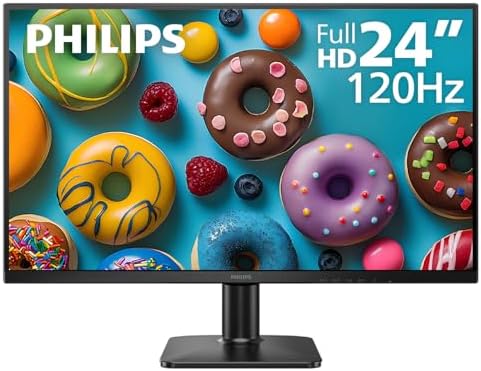
- Best overall: Philips 241V8LB. The lightest stated weight here at 6.39 pounds, with VESA mounting stated for tight desks.
- Best for smooth motion: LG 24U411A-B. A 120Hz IPS panel with HDR10 and 1ms Motion Blur Reduction stated.
- Best for gaming connections: Sceptre 24-inch Prime Gaming Monitor. Two HDMI and two DisplayPort inputs stated, plus built-in speakers.
- Best for high refresh play: AOC G24B36N. A 144Hz native rate with 180Hz overclocking and a 0.5ms MPRT stated.
- Best for legacy connections: Philips 24E2N2100. HDMI and VGA inputs stated, covering newer and older computers on one screen.
Quick Answer
For most small desks, the Philips 241V8LB pairs the lightest stated weight with VESA mounting and a 100Hz VA panel. If you want an IPS panel and a higher refresh rate, the LG 24U411A-B at 120Hz or the Philips 24E2N2100 at 120Hz fit that brief, while the AOC G24B36N and the Sceptre Prime suit play first, with higher stated refresh rates and more gaming inputs.
Comparison Table
| Product | Best for | Key stated figure | Trade-off | Buy |
|---|---|---|---|---|
| Philips 241V8LB | General work on a small desk | 21.3 inches wide, 6.39 pounds | Refresh rate is 100Hz, the lowest stated here | View on Amazon |
| LG 24U411A-B | IPS viewing and 120Hz motion | 21.2 inches wide, 7.1 pounds | Only one input type, HDMI, is stated | View on Amazon |
| Sceptre 24-inch Prime Gaming Monitor | Multiple gaming devices | 15.6 inches high, the lowest stated height | No weight is stated in the listing | View on Amazon |
| AOC G24B36N | Fast play on a VA panel | 21.42 inches wide, 144Hz native | No weight is stated in the listing | View on Amazon |
| Philips 24E2N2100 | HDMI plus VGA connections | 9.35 pounds, the heaviest stated weight | Stated dimensions list a 12.56-inch width and a 21.41-inch height | View on Amazon |
Decision Guide
Start with depth, because depth eats into the working area in front of the screen. The Philips 24E2N2100 states a length of 1.3 inches, the smallest stated length of the five, while the Philips 241V8LB and the LG 24U411A-B both state 8.7 inches. The Sceptre Prime states 6.7 inches and the AOC G24B36N states 7.79 inches. Check the product page for current details before ordering.
Next, look at height if the monitor has to fit under a shelf. The Sceptre Prime states 15.6 inches, the lowest of the five, followed by the AOC at 16.26 inches, while the Philips 241V8LB and the LG both state 16.4 inches. The Philips 24E2N2100 states a height of 21.41 inches alongside a width of 12.56 inches, a pairing unlike the other four, so measure against those figures exactly as stated.
If you plan to mount the screen, narrow the choice quickly: VESA mounting is stated only for the Philips 241V8LB and the Philips 24E2N2100. The other three listings state no VESA mounting, so a wall or arm mount cannot be assumed for them.
On weight, use only the stated figures: 6.39 pounds for the Philips 241V8LB, 7.1 pounds for the LG and 9.35 pounds for the Philips 24E2N2100. The Sceptre and AOC listings state no weight, so all five cannot be ranked on weight.
For panel choice, the LG and the Philips 24E2N2100 state IPS panels, while the Philips 241V8LB and the AOC state VA panels; the Philips 241V8LB states a 178/178 degree viewing angle. The Sceptre listing states no panel type. For motion, the stated rates run from 100Hz on the Philips 241V8LB, through 120Hz on the LG and the Philips 24E2N2100, to 165Hz on the Sceptre and 144Hz native with 180Hz overclocking on the AOC.
1. Philips 241V8LB — Best overall
This Philips uses a 23.8-inch viewable VA panel at 1920 x 1080 with a 100Hz refresh rate and a 4ms GtG response time stated. Its stated size is 21.3 inches wide, 16.4 inches high and 8.7 inches deep, and at 6.39 pounds it carries the lightest stated weight of the three listings that give a weight. Against the two gaming models, it trades refresh rate for VESA mounting and a tilt adjustment, both stated.
| Spec | From the listing |
|---|---|
| Panel and size | 23.8-inch VA, 1920 x 1080 |
| Refresh rate | 100Hz |
| Dimensions | 8.7 x 21.3 x 16.4 inches |
| Weight | 6.39 pounds |
| Color | Black |
2. LG 24U411A-B — Best for smooth motion
The LG states a 24-inch IPS panel at 1920 x 1080 with a 120Hz refresh rate, HDR10 and a 1ms Motion Blur Reduction figure. Its stated dimensions are 21.2 inches wide, 16.4 inches high and 8.7 inches deep, and its stated weight is 7.1 pounds. Compared with the Philips 241V8LB at the same depth and height, it offers the IPS panel and the higher rate, but its listing states HDMI only and gives no VESA mounting.
| Spec | From the listing |
|---|---|
| Panel and size | 24-inch IPS, 1920 x 1080 |
| Refresh rate | 120Hz |
| Dimensions | 8.7 x 21.2 x 16.4 inches |
| Weight | 7.1 pounds |
| Color | Black |
3. Sceptre 24-inch Prime Gaming Monitor — Best for gaming connections
The Sceptre states a 24-inch screen with a 165Hz refresh rate, two HDMI ports and two DisplayPort inputs, the widest stated input set of the five. Built-in speakers are stated, which removes a separate speaker from a small desk. Its stated dimensions are 21.3 inches wide, 15.6 inches high and 6.7 inches deep, the lowest stated height here. The listing states no weight and no panel type. Skip it if you need a stated weight or a stated panel type before buying.
| Spec | From the listing |
|---|---|
| Screen size | 24 inches |
| Refresh rate | 165Hz |
| Dimensions | 6.7 x 21.3 x 15.6 inches |
| Weight | The listing does not state it |
| Color | Machine Black |
4. AOC G24B36N — Best for high refresh play
The AOC states a 23.8-inch viewable VA panel at 1920 x 1080 with a 3000:1 contrast ratio, a 144Hz native refresh rate, 180Hz overclocking and a 0.5ms MPRT response time. Its stated dimensions are 21.42 inches wide, 16.26 inches high and 7.79 inches deep, the widest of the five. It states DisplayPort 1.4 and HDMI inputs, Adaptive Sync and HDR Ready support, plus Game Mode presets and Shadow Control. The listing states no weight, so compare it on size and speed.
| Spec | From the listing |
|---|---|
| Panel and size | 23.8-inch viewable VA, 1920 x 1080 |
| Refresh rate | 144Hz native, 180Hz overclocked |
| Dimensions | 7.79 x 21.42 x 16.26 inches |
| Weight | The listing does not state it |
| Color | Black |
5. Philips 24E2N2100 — Best for legacy connections
This second Philips states a 24-inch IPS panel at 1920 x 1080 with a 120Hz refresh rate, HDMI 1.4 and VGA inputs, Adaptive Sync and VESA mounting. The VGA input sets it apart from the other four, none of which states VGA. Its stated weight is 9.35 pounds, the heaviest of the three listings that state a weight. Its stated dimensions are a length of 1.3 inches, a width of 12.56 inches and a height of 21.41 inches, which differ in shape from the other four, so check those figures against your space exactly as stated. Skip it if the stated height does not fit under your shelf.
| Spec | From the listing |
|---|---|
| Panel and size | 24-inch IPS, 1920 x 1080 |
| Refresh rate | 120Hz |
| Dimensions | 1.3 x 12.56 x 21.41 inches |
| Weight | 9.35 pounds |
| Color | Black |
Shopping Checklist
Work through these steps against the stated figures:
- Measure your desk width, depth and any shelf clearance, then compare each figure with the stated dimensions.
- Decide whether the monitor will stand on the desk or mount, and confirm VESA mounting is stated if you plan to mount it.
- Count the devices you will connect and match them to the inputs each listing states.
- Check the stated panel type and refresh rate against your main use, work, video or play.
- Read the return terms for the monitor size you settle on.
- Compare your final two monitors side by side on depth and stated weight.
FAQ
Does a 24 inch monitor fit a small apartment desk?
Based on the listing details, four stated widths run from 21.2 to 21.42 inches; the Philips 24E2N2100 states 12.56 inches wide and 21.41 inches high, so measure your desk against each stated figure before choosing. Depth varies more, from a stated 1.3 inches to 8.7 inches, so measure front to back as well as side to side.
Which panel type should I choose, IPS or VA?
Two listings state IPS panels, the LG 24U411A-B and the Philips 24E2N2100, and two state VA panels, the Philips 241V8LB and the AOC G24B36N. The Philips 241V8LB states a 178/178 degree viewing angle and the AOC states a 3000:1 contrast ratio. Note that the Sceptre listing states no panel type.
Do I need a high refresh rate for work and video?
The stated rates here run from 100Hz to 165Hz, with the AOC adding 180Hz overclocking above its 144Hz native rate. The higher-rate listings tie their figures to gaming and motion clarity, while the 100Hz and 120Hz models are presented for work and general use. Match the rate to your fastest regular use.
Final Verdict
For a single monitor on a small desk, the Philips 241V8LB is the balanced choice, with the lightest stated weight, VESA mounting and a 100Hz VA panel. Choose the LG 24U411A-B for a 120Hz IPS screen at a stated 21.2-inch width, or the Philips 24E2N2100 if you need VGA as well as HDMI. If play comes first, the Sceptre Prime brings the most stated inputs and built-in speakers, and the AOC G24B36N brings the highest stated overclocked rate. Measure depth and shelf height first, because those figures separate these five more than screen size does.
Prime covers fast, free delivery on eligible items. See whether a Prime free trial is available for your account.
Check Prime on Amazon →Types of Computer Monitors
Monitors outside gaming-specific models are grouped mainly by resolution and by color accuracy. Standard monitors cover general productivity use. Color-accurate monitors (rated for DCI-P3 or similar) suit photo and video editing, where consistent, wide color coverage matters more than raw refresh rate.
A blue-light filter (hardware or software-based) reduces a specific part of the light spectrum associated with eye strain during long sessions, which is a separate feature from the panel's resolution or color accuracy.
Frequently Asked Questions
What does a DCI-P3 color rating mean on a monitor?
It indicates the monitor can display a wider range of colors than a standard sRGB-rated panel, which matters most for photo, video, and design work where accurate color reproduction is important.
Does a blue-light filter reduce image quality?
It can shift color temperature noticeably warmer while active, so many users reserve blue-light filtering for evening use and turn it off for color-critical work.
Related Guides
No related guides were supplied for this article, so this section contains no links.
Product and ASIN Reference
| Product | ASIN | Buy |
|---|---|---|
| Philips 241V8LB | B0C8ZKV5R9 | View on Amazon |
| LG 24U411A-B | B0FHKDC59F | View on Amazon |
| Sceptre 24-inch Prime Gaming Monitor | B0H5FQ6J4J | View on Amazon |
| AOC G24B36N | B0H85B13JT | View on Amazon |
| Philips 24E2N2100 | B0FKJJGSSR | View on Amazon |


Write Your Review
No reviews yet. Be the first to share your experience!