
Pick the LG 27-inch UltraGear for the largest flat IPS screen here, the ASUS TUF for a 23.8-inch IPS panel with an overclock figure above 144Hz, and a 22-inch model if desk width is your main limit. All five listings state 1920 x 1080 resolution and a 144Hz figure, so the choice comes down to size, panel type, sync support, speakers, and footprint.
Two monitors are 22 inches, one is 23.8 inches viewable, and two are 27 inches, with stated widths from 19.4 inches to 24.1 inches and stated weights from 4.52 pounds to 9.5 pounds where a weight is stated. Only some listings state IPS, only one states a curved screen, and speaker, HDR, and sync details vary.
As an Amazon Associate, we earn from qualifying purchases.



Pick by Your Need
- Best overall: LG UltraGear 27-inch. Largest flat IPS option here, with 144Hz, 1ms MBR, and both G-Sync compatibility and FreeSync stated.
- Best for higher refresh headroom: ASUS TUF Gaming 23.8-inch. The listing states 144Hz with an overclock to 146Hz and ELMB Sync.
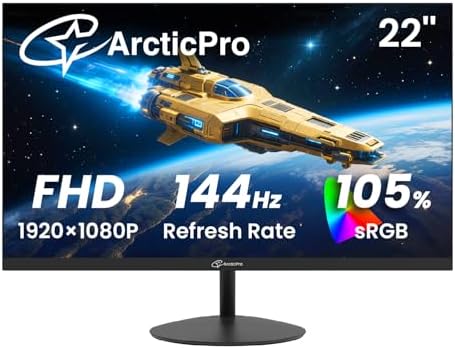
- Best compact: ArcticPro 22-inch. The narrowest stated width at 19.4 inches and the lightest stated weight at 4.52 pounds.
- Best for built-in audio in a small size: Sceptre 22-inch. Built-in speakers and a 22-inch screen in a 19.9-inch stated width.
- Best curved: SANSUI 27-inch Curved. The only curved model here, with a stated 1500R curvature and up to 160Hz stated alongside 144Hz support.
Quick Answer
For most buyers, the LG UltraGear 27-inch is the clearest match, because its listing states IPS, 144Hz, 1ms MBR, G-Sync compatibility, FreeSync, HDR10, and a built-in speaker. Choose the ASUS TUF 23.8-inch for a smaller IPS screen and the stated overclock to 146Hz, or the ArcticPro 22-inch if width and weight matter most.
Comparison Table
| Product | Best for | Key stated figure | Trade-off | Buy |
|---|---|---|---|---|
| Sceptre 22-inch Gaming Monitor | Small desks needing speakers | 22 inches, 19.9 inches wide, 7.0 pounds | No sync technology is stated | View on Amazon |
| ASUS TUF Gaming 23.8-inch | IPS play with refresh headroom | 23.8 inches viewable, overclock to 146Hz | No HDR figure is stated | View on Amazon |
| LG UltraGear 27-inch | Larger flat IPS play | 27 inches, 24.1 inches wide, 9.5 pounds | Widest and heaviest stated option here | View on Amazon |
| ArcticPro 22-inch | Narrow, light setups | 22 inches, 19.4 inches wide, 4.52 pounds | No response-time figure in milliseconds is stated | View on Amazon |
| SANSUI 27-inch Curved | Curved 27-inch play | 27 inches, 1500R curvature, 24.09 inches wide | No weight is stated | View on Amazon |
Decision Guide
Start with width. The ArcticPro states 19.4 inches wide and the Sceptre states 19.9 inches wide, so either 22-inch model leaves more side room than the ASUS at 21.3 inches wide or the two 27-inch models at 24.1 inches and 24.09 inches wide. If you need a narrow desk fit, choose the ArcticPro or the Sceptre, and confirm stated height as well: 14.25 inches for the ArcticPro and 15.5 inches for the Sceptre.
Next, decide on flat or curved. The SANSUI is the only curved model here, with a stated 1500R curvature, so if you need a curved view, choose the SANSUI. For a dual-monitor arrangement, the Sceptre listing states a minimal bezel design for that use.
Then look at panel and sync details. The ASUS and the LG both state IPS, and the ArcticPro states a VA panel with 178-degree viewing angles. The LG states both NVIDIA G-SYNC compatibility and AMD FreeSync, the SANSUI states FreeSync, and the ASUS states ELMB Sync. The Sceptre and ArcticPro listings state no such sync label, so if sync support is a requirement, choose one of the three listings that states it.
Speakers and picture controls can settle a close call. Built-in speakers are stated for the Sceptre and a built-in speaker for the LG. The SANSUI states a Game Assistant with crosshair, timer, and counter, plus preset modes. Both the ArcticPro and SANSUI state a 4000 to 1 contrast ratio.
Finally, weigh stated weight if you move the monitor often. Of the four listings that state a weight, the ArcticPro is the lightest stated at 4.52 pounds and the LG the heaviest stated at 9.5 pounds. The SANSUI states no weight. Check the product page for current details before ordering.
1. Sceptre 22-Inch Gaming Monitor — Best small monitor with speakers
The Sceptre pairs a 22-inch screen and 1920 x 1080 resolution with a stated refresh rate of up to 144Hz. Its listing states HDMI and DisplayPort connections and built-in speakers. At 19.9 inches wide, 15.5 inches high, and 7.0 pounds, it is wider and heavier than the ArcticPro 22-inch, so its advantage is connection and audio coverage rather than the smallest footprint.
| Spec | From the listing |
|---|---|
| Screen size | 22 inches |
| Resolution | FHD 1080p, 1920 x 1080 stated in the listing |
| Refresh rate | Up to 144Hz |
| Dimensions | 7.0 inches long, 19.9 inches wide, 15.5 inches high |
| Weight | 7.0 pounds |
| Color | Machine Black |
2. ASUS TUF Gaming 23.8-Inch Monitor — Best for refresh headroom
The ASUS sits between the other sizes, with a 23.8-inch viewable Full HD screen at 1920 x 1080 and an IPS panel. Its listing states 144Hz with an overclock to 146Hz, plus 1ms response, ELMB Sync, DisplayWidget Center for adjusting settings with a mouse, and Shadow Boost for dark areas. At 21.3 inches wide and 7.3 pounds, it takes more desk width than either 22-inch model while staying below the 27-inch widths.
Skip it if you need a stated HDR figure, because this listing states none, while the LG and SANSUI listings both state HDR support.
| Spec | From the listing |
|---|---|
| Screen size | 23.8 inches viewable, 24-inch class |
| Resolution | 1920 x 1080 Full HD |
| Refresh rate | 144Hz, overclock to 146Hz |
| Panel | IPS |
| Dimensions | 6.9 inches long, 21.3 inches wide, 15.5 inches high |
| Weight | 7.3 pounds |
3. LG UltraGear 27-Inch Monitor — Best overall
The LG is the largest flat monitor here, with a 27-inch IPS screen, 1920 x 1080 resolution, a native 144Hz refresh rate, and 1ms MBR stated. It states both NVIDIA G-SYNC compatibility and AMD FreeSync, plus HDR10 and a built-in speaker. Those extras come with the largest stated footprint here: 24.1 inches wide, 18.4 inches high, 8.7 inches long, and 9.5 pounds, the heaviest stated weight of the four listings that state a weight.
| Spec | From the listing |
|---|---|
| Screen size | 27 inches |
| Resolution | Full HD 1920 x 1080 |
| Refresh rate | 144Hz native |
| Response figure | 1ms MBR |
| Dimensions | 8.7 inches long, 24.1 inches wide, 18.4 inches high |
| Weight | 9.5 pounds |
4. ArcticPro 22-Inch Gaming Monitor — Best compact
The ArcticPro matches the Sceptre at 22 inches and 1920 x 1080, with a stated maximum refresh rate of 144Hz, but differs on panel and build. Its listing states a VA panel, 178-degree viewing angles, tilt angles of -5 degrees and 15 degrees within stated tolerances, a 3-sided frameless design, and a VESA mount. It is the narrowest listing here at 19.4 inches wide, the lightest stated at 4.52 pounds, and the lowest in stated height at 14.25 inches. Its listing states a rapid response time without giving a millisecond figure.
| Spec | From the listing |
|---|---|
| Screen size | 22 inches |
| Resolution | 1920 x 1080 Full HD |
| Refresh rate | 144Hz maximum |
| Contrast ratio | 4000:1 |
| Dimensions | 7.4 inches long, 19.4 inches wide, 14.25 inches high |
| Weight | 4.52 pounds |
5. SANSUI 27-Inch Curved Monitor — Best curved
The SANSUI is the only curved monitor here, with a 27-inch screen, a stated 1500R curvature, and 1920 x 1080 resolution. Its listing states up to 160Hz and support for 144Hz and 120Hz depending on the signal source device hardware. It also states 1ms MPRT, FreeSync, a 4000 to 1 contrast ratio, 300 nits brightness, and 110 percent sRGB coverage. At 24.09 inches wide and 17.8 inches high it is nearly as wide as the LG, and its listing states no weight.
Skip it if you need a flat screen for a matched multi-monitor layout, because this is the only curved panel in the group.
| Spec | From the listing |
|---|---|
| Screen size | 27 inches |
| Resolution | FHD 1920 x 1080 |
| Refresh rate | Up to 160Hz, with 144Hz support stated |
| Curvature | 1500R |
| Dimensions | 7.64 inches long, 24.09 inches wide, 17.8 inches high |
| Weight | The listing does not state it |
Shopping Checklist
Before you order:
- Measure your desk width and shelf height, then compare them with each stated width and height.
- Check stated dimensions and mount details, including the VESA mount stated for the ArcticPro.
- Check the panel type and sync support each listing states.
- Check the return window on the product page for the monitor you choose.
- Compare finalists side by side on screen size, refresh figure, and stated weight.
FAQ
Does every monitor here actually state 144Hz?
Yes, based on the listing details. Each listing states a 144Hz figure, the ASUS adds an overclock to 146Hz, and the SANSUI states up to 160Hz with 144Hz support as well. The SANSUI listing ties its 120Hz and 144Hz support to the signal source hardware.
Which size should I choose, 22, 23.8, or 27 inches?
Choose by stated width. The 22-inch models state 19.4 inches and 19.9 inches wide, the ASUS states 21.3 inches, and the 27-inch models state about 24.1 inches. All five state the same 1920 x 1080 resolution, so the choice is about screen area and footprint, not resolution.
What sync support should I look for?
Look for a sync label stated in the listing itself. The LG states both G-Sync compatibility and FreeSync, the SANSUI states FreeSync, and the ASUS states ELMB Sync, while the Sceptre and ArcticPro listings state no such label. Match the stated label to the graphics hardware you plan to connect.
Final Verdict
The LG UltraGear 27-inch is the strongest all-round pick here, combining the largest flat IPS screen with 144Hz, 1ms MBR, both major sync labels, HDR10, and a built-in speaker. The ASUS TUF fits better if you want a mid-size IPS screen and the stated 146Hz overclock. For a small desk, the ArcticPro is the narrowest and lightest stated package, while the Sceptre adds speakers and two connection types at 22 inches. The SANSUI stands apart as the curved choice.
Prime covers fast, free delivery on eligible items. See whether a Prime free trial is available for your account.
Check Prime on Amazon →Types of Gaming Monitors
Gaming monitors are grouped mainly by refresh rate and by panel type. High-refresh panels (144Hz+) show smoother motion if the GPU can render fast enough to use it. Curved HDR panels add contrast range and a wider field of view compared to a flat standard-dynamic-range panel at the same size.
An adaptive-sync feature only helps when the graphics card supports that specific standard, so matching the monitor's adaptive-sync branding to the installed GPU matters as much as the refresh-rate spec on its own.
Frequently Asked Questions
Does HDR on a gaming monitor matter if the content isn't HDR?
Not much -- HDR's expanded brightness and contrast range only shows a real benefit when the game or video content itself is mastered in HDR; standard content won't gain the same effect.
What's the benefit of an ultra-wide curved gaming monitor?
It adds horizontal field of view and can add immersion in supported games, though not every game natively supports the wider aspect ratio without stretching or black bars.
Related Guides
No related guides were supplied for this article, so this section contains no links.
Product and ASIN Reference
| Product | ASIN | Buy |
|---|---|---|
| Sceptre 22-Inch Gaming Monitor | B0FT21HKZ6 | View on Amazon |
| ASUS TUF Gaming 23.8-Inch Monitor | B0F234D8G9 | View on Amazon |
| LG UltraGear 27-Inch Monitor | B0GX78512M | View on Amazon |
| ArcticPro 22-Inch Gaming Monitor | B0DDP95J7T | View on Amazon |
| SANSUI 27-Inch Curved Monitor | B0F2T7WLFK | View on Amazon |



Write Your Review
No reviews yet. Be the first to share your experience!