
For most buyers here, the 27-inch 4K QD-OLED PG27UCDM suits a 4K setup, packing 4K, 240Hz and a 0.03ms response into the smallest stated 4K panel here. Buyers who want the largest stated screen here can choose between the two 32-inch 4K OLED picks, while the PG32UCDP suits buyers who want both 4K play and a 480Hz FHD mode.
All five picks carry the ASUS ROG name. Four state 240Hz with a 0.03ms response, three state 4K at 3,840 × 2,160, and the Fast IPS pick states 180Hz with 1ms.
As an Amazon Associate, we earn from qualifying purchases.



Pick by Your Need
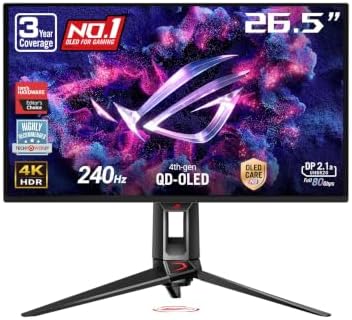
- Best overall: PG27UCDM. A 26.5-inch 4K QD-OLED panel with DisplayPort 2.1, 240Hz and a 0.03ms response time.
- Best big-screen 4K: PG32UCDMR. A 32-inch 4K QD-OLED panel with USB-C 90W and DisplayHDR 400 True Black.
- Best dual-mode: PG32UCDP. A 32-inch 4K WOLED panel that states 4K at 240Hz or FHD at 480Hz.
- Best glossy QHD OLED: XG27AQDMGR. A 26.5-inch QHD TrueBlack Glossy WOLED panel with 240Hz and a 0.03ms response time.
- Best Fast IPS pick: XG27ACS. A 27-inch 1440p Fast IPS panel with 180Hz, a 1ms response time and ELMB Sync.
Quick Answer
The PG27UCDM suits buyers who want 4K, 240Hz and QD-OLED in a 27-inch panel, while the PG32UCDMR suits buyers who want the same 4K QD-OLED spec on a 32-inch screen with USB-C 90W. The PG32UCDP suits buyers who want a second mode, since it is the only pick that states FHD at 480Hz alongside 4K at 240Hz.
Comparison Table
| Monitor | Best for | Key stated spec | Trade-off | Buy |
|---|---|---|---|---|
| XG27AQDMGR | Glossy QHD OLED play | 26.5-inch QHD WOLED, 240Hz, 0.03ms | 1440p only; stated dimensions conflict | View on Amazon |
| PG27UCDM | 4K QD-OLED in 27 inches | 26.5-inch 4K QD-OLED, 240Hz, 0.03ms | No HDR certification is stated | View on Amazon |
| PG32UCDMR | Big-screen 4K OLED | 32-inch 4K QD-OLED, 240Hz, USB-C 90W | Heaviest stated weight, 19.2 pounds | View on Amazon |
| PG32UCDP | Two refresh modes | 32-inch 4K WOLED, 4K 240Hz or FHD 480Hz | No OLED Care Pro is stated | View on Amazon |
| XG27ACS | Fast IPS play | 27-inch 1440p Fast IPS, 180Hz, 1ms | 180Hz and 1ms vs 240Hz and 0.03ms | View on Amazon |
Decision Guide
Resolution splits this round into two groups. The PG27UCDM, the PG32UCDMR and the PG32UCDP state 4K at 3,840 × 2,160, while the XG27AQDMGR and the XG27ACS state 1440p at 2,560 × 1,440. Buyers who want the highest stated pixel count should pick 4K.
Size splits the round the same way. The two 32-inch picks state widths of 28.3 inches for the PG32UCDMR and 28.1 inches for the PG32UCDP, against 23.8 inches for the XG27AQDMGR, 24.0 inches for the PG27UCDM and 25.3 inches for the XG27ACS. Measure the desk first.
Panel type is the third split. The PG27UCDM and the PG32UCDMR state QD-OLED panels, the XG27AQDMGR and the PG32UCDP state WOLED panels, and the XG27ACS states a Fast IPS panel. The XG27AQDMGR is the only pick that states a glossy panel, with its TrueBlack Glossy finish. Four of the five state 240Hz and a 0.03ms response time, while the XG27ACS states 180Hz and 1ms.
Ports and protection narrow the choice further. The PG27UCDM is the only pick that states DisplayPort 2.1, and the PG32UCDMR is the only pick that states USB-C 90W. OLED Care Pro is stated for three picks — the XG27AQDMGR, the PG27UCDM and the PG32UCDMR — each with a Neo Proximity Sensor. No OLED Care Pro is stated for the PG32UCDP or the XG27ACS.
1. ASUS ROG XG27AQDMGR 27-Inch QHD OLED — Best Glossy QHD OLED
The XG27AQDMGR’s 26.5-inch QHD panel runs at 2,560 × 1,440 with a 240Hz refresh rate and a 0.03ms response time. Its TrueBlack Glossy WOLED finish makes it the only pick here that states a glossy panel, and the listing states VESA DisplayHDR 400 True Black compliance with a 99% DCI-P3 gamut, true 10-bit color and Delta E under 2.
The size field lists 14.5 × 23.8 × 2.5 inches while the spec table lists 7.4 inches long, 23.8 inches wide and 19.7 inches high, so check the product page before trusting either set for depth and height. Skip it if 4K resolution matters: this pick states 1440p only.
| Spec | From the listing |
|---|---|
| Panel | 26.5-inch QHD TrueBlack Glossy WOLED, 2,560 × 1,440 |
| Refresh rate | 240Hz |
| Response time | 0.03ms |
| HDR | VESA DisplayHDR 400 True Black |
2. ASUS ROG PG27UCDM 27-Inch 4K QD-OLED — Best 4K QD-OLED
The PG27UCDM packs 4K at 3,840 × 2,160 into a 26.5-inch QD-OLED panel, refreshing at 240Hz with a 0.03ms response. Its fourth-generation QD-OLED technology is stated to deliver sharper imagery with a longer lifespan than previous-generation OLED panels. OLED Anti-Flicker 2.0 is stated to cut flicker by 20% against previous-generation panels, and burn-in protection comes from OLED Care Pro and its Neo Proximity Sensor.
At 16.8 pounds, this pick outweighs the two 1440p picks at 14.6 pounds each, and no HDR certification or USB-C connection is stated for it.
| Spec | From the listing |
|---|---|
| Panel | 26.5-inch 4K QD-OLED, 3,840 × 2,160 |
| Refresh rate | 240Hz |
| Response time | 0.03ms |
| Anti-flicker | OLED Anti-Flicker 2.0, 20% less flicker than previous-generation panels |
3. ASUS ROG PG32UCDMR 32-Inch 4K QD-OLED — Best 32-Inch 4K OLED
A 32-inch 4K QD-OLED panel at 3,840 × 2,160 anchors the PG32UCDMR, refreshing at 240Hz with a 0.03ms GTG response time. It states VESA DisplayHDR 400 True Black compliance and a 99% DCI-P3 gamut. Delta E under 2 and true 10-bit color are stated for its color accuracy, alongside an optional uniform brightness setting, OLED Care Pro with its Neo Proximity Sensor and USB-C 90W, the only stated USB-C wattage here.
Its stated width of 28.3 inches is the widest stated width here, and its stated weight of 19.2 pounds is the heaviest stated weight here, so buyers with a shallow desk should measure the stated 10.9-inch length first.
| Spec | From the listing |
|---|---|
| Panel | 32-inch 4K QD-OLED, 3,840 × 2,160 |
| Refresh rate | 240Hz |
| Response time | 0.03ms GTG |
| HDR | VESA DisplayHDR 400 True Black |
| USB-C | 90W |
4. ASUS ROG PG32UCDP 32-Inch 4K Dual-Mode OLED — Best Dual-Mode
Two refresh modes set the PG32UCDP apart: 4K at 240Hz or FHD at 480Hz on a 32-inch WOLED panel at 3,840 × 2,160. A 0.03ms response time, ROG OLED Anti-Flicker technology stated to reduce flicker during refresh-rate changes, a uniform brightness option and a custom heatsink are stated for it. Dynamic AI Crosshair, AI Sniper and AI Visual functions are stated as its AI features.
At 22.8 inches, this pick has the tallest stated height here, while its stated weight of 16.1 pounds is lighter than the other 32-inch pick, and no OLED Care Pro or USB-C wattage is stated for it.
| Spec | From the listing |
|---|---|
| Panel | 32-inch 4K WOLED, 3,840 × 2,160 |
| Dual mode | 4K at 240Hz or FHD at 480Hz |
| Response time | 0.03ms |
| Weight | 16.1 pounds |
5. ASUS ROG XG27ACS 27-Inch 1440p Fast IPS — Best Fast IPS Pick
The XG27ACS brings the round’s only stated Fast IPS panel, a 27-inch 1440p panel at 2,560 × 1,440 with a 180Hz refresh rate and a 1ms GTG response time. ASUS ELMB Sync is stated to run ELMB together with a variable refresh rate, eliminating ghosting and tearing, while DisplayHDR 400 is stated with a 133% sRGB gamut and the DisplayWidget Center application enables easy OSD access with a mouse.
This pick trades stated speed for panel type: the other four picks state 240Hz against 180Hz here, and the four OLED picks state 0.03ms against 1ms here. At 14.6 pounds, it matches the XG27AQDMGR as the lightest stated weight here.
| Spec | From the listing |
|---|---|
| Panel | 27-inch 1440p Fast IPS, 2,560 × 1,440 |
| Refresh rate | 180Hz |
| Response time | 1ms GTG |
| HDR | DisplayHDR 400 |
| Weight | 14.6 pounds |
Shopping Checklist
- Measure the desk width first: the widest stated width here is 28.3 inches on the PG32UCDMR.
- Check the stated weight against the mount or arm limit: stated weights run from 14.6 to 19.2 pounds.
- Confirm the ports needed: DisplayPort 2.1 is stated only for the PG27UCDM, and USB-C 90W only for the PG32UCDMR.
- Decide between 4K and 1440p before choosing a size.
- Check the product page for the XG27AQDMGR dimensions first.
FAQ
Which pick has the highest stated resolution?
The three 4K picks are the PG27UCDM, the PG32UCDMR and the PG32UCDP, each stating 3,840 × 2,160. The two 1440p picks are the XG27AQDMGR and the XG27ACS, each stating 2,560 × 1,440. The 27-inch PG27UCDM is the smallest stated 4K panel here.
What does dual mode mean on the PG32UCDP?
Dual mode means the PG32UCDP states two refresh modes: 4K with a 240Hz refresh rate, or FHD with a 480Hz refresh rate. It is the only pick here that states a second mode. The other four picks state a single refresh rate each: 240Hz on three of them and 180Hz on the XG27ACS.
Which picks state burn-in protection?
The XG27AQDMGR, the PG27UCDM and the PG32UCDMR are the three picks that state OLED Care Pro. Each pairs it with a Neo Proximity Sensor that blanks the screen when the user steps away. For the PG32UCDP and the XG27ACS, OLED Care Pro is not stated.
Final Verdict
The PG27UCDM suits most buyers in this round, pairing 4K QD-OLED with 240Hz, a 0.03ms response and DisplayPort 2.1 in a 27-inch panel. The PG32UCDMR moves the same spec to a 32-inch screen and adds USB-C 90W, while the PG32UCDP offers the only stated second mode, FHD at 480Hz. The XG27AQDMGR suits buyers who want a glossy QHD OLED panel, and the XG27ACS suits buyers who want the only stated Fast IPS pick here.
Prime covers fast, free delivery on eligible items. See whether a Prime free trial is available for your account.
Check Prime on Amazon →Product and ASIN Reference
| Product | ASIN | Buy |
|---|---|---|
| ASUS ROG XG27AQDMGR 27 Inch 1440p 240Hz Glossy OLED HDR Gaming Monitor | B0FWHPY1GJ | View on Amazon |
| ASUS ROG PG27UCDM 27 Inch 4K 240Hz OLED Gaming Monitor QD-OLED | B0DM6SHQTN | View on Amazon |
| ASUS ROG PG32UCDMR 32 Inch 4K 240Hz OLED Gaming Monitor QD-OLED | B0FP11PC4F | View on Amazon |
| ASUS ROG PG32UCDP 32 Inch 4K 240Hz OLED Gaming Monitor | B0D7NNK43H | View on Amazon |
| ASUS ROG XG27ACS 27 Inch 1440p 180Hz USB-C G-SYNC HDR Gaming Monitor | B0CV24GQ9W | View on Amazon |
Types of Gaming Monitors
Gaming monitors are grouped mainly by refresh rate and by panel type. High-refresh panels (144Hz+) show smoother motion if the GPU can render fast enough to use it. Curved HDR panels add contrast range and a wider field of view compared to a flat standard-dynamic-range panel at the same size.
An adaptive-sync feature only helps when the graphics card supports that specific standard, so matching the monitor's adaptive-sync branding to the installed GPU matters as much as the refresh-rate spec on its own.
Frequently Asked Questions
Does HDR on a gaming monitor matter if the content isn't HDR?
Not much -- HDR's expanded brightness and contrast range only shows a real benefit when the game or video content itself is mastered in HDR; standard content won't gain the same effect.
What's the benefit of an ultra-wide curved gaming monitor?
It adds horizontal field of view and can add immersion in supported games, though not every game natively supports the wider aspect ratio without stretching or black bars.










Write Your Review
No reviews yet. Be the first to share your experience!