
If you want the most vertical room for code in a 28.2-inch frame, start with the RD280U or RD280UA; if you want a larger 32-inch panel, look at the RD320UA or RD320U; and if refresh rate is the deciding factor, the RD280UG is the only one of the five whose listing states 120Hz. All five are BenQ programming monitors, so the choice here is less about product type and more about screen size, stated resolution, stand type and the space the unit takes up.
We compared the five listings on the figures they state: size, resolution, refresh rate and USB-C power where given, plus listed length, width, height and weight. Where a figure is not stated, this article says so.
As an Amazon Associate, we earn from qualifying purchases.
Pick by Your Need
- Best overall: BenQ RD280U. It pairs a 3840×2560 resolution and 3:2 aspect ratio with 90W USB-C and KVM in the listing.
- Best for fast scrolling: BenQ RD280UG. Its listing states a 120Hz refresh rate, which none of the other four listings states.
- Best large screen: BenQ RD320UA. Its listing states a 32-inch size and a 3840×2160 resolution for more room across the panel.
- Best for an adjustable arm: BenQ RD280UA. Its listing describes an Ergo Flexible Arm rather than a fixed stand description.
- Best for late sessions: BenQ RD320U. Its listing states Night Hours Protection with minimum brightness technology for dark room use.
Quick Answer
For most programmers, the RD280U is the balanced starting point, with a stated 3840×2560 resolution, a 3:2 aspect ratio and 90W USB-C. Choose the RD280UG instead if the stated 120Hz refresh rate matters more than the extra stated connectivity, and choose one of the two 32-inch models if you would rather have the larger panel and can fit its listed footprint.
Comparison Table
| Product | Best for | Key stated figure | Trade-off |
|---|---|---|---|
| BenQ RD280U | Balanced 28.2-inch coding setup | 3840×2560 resolution, 3:2 aspect ratio | Refresh rate is not stated in the listing |
| BenQ RD280UG | Faster scrolling and cursor movement | 120Hz refresh rate stated | The RD280UG listing gives its size as 28.2 inches in its name and 28.0 in its spec table |
| BenQ RD320UA | Larger panel with USB-C | 32-inch size, 3840×2160 resolution | Listed weight is 34.17 pounds, the joint heaviest stated |
| BenQ RD320U | Larger panel for dark rooms | 32-inch size, 3840×2160 resolution | Listed weight is 34.17 pounds, the joint heaviest stated |
| BenQ RD280UA | Flexible arm positioning | 3840×2560 resolution stated | Listed height is 27.0 inches, the tallest stated of the five. The RD280UA listing states Fine-Coated Panel in its product name and Nano Matte Panel in its listing facts. |
Decision Guide
Start with panel size, because it drives both the workspace and the desk space. The two 32-inch models each list a length of 28.0 inches and a width of 23.0 inches, while the three smaller models each list a width of 24.0 inches. Measure your desk against the exact listed dimensions for the model you choose.
If you need more vertical room for long files, the RD280U and RD280UA state a 3840×2560 resolution with the RD280U also stating a 3:2 aspect ratio. If you need a wider 16:9-style layout, note that neither 32-inch listing states an aspect ratio; each states 3840×2160 only. If you need smoother scrolling through long files, choose the RD280UG, because its listing states a 120Hz refresh rate and the other four listings state no refresh rate at all. The RD280UA listing states Fine-Coated Panel in its product name and Nano Matte Panel in its listing facts.
If you need USB-C power for a laptop, four listings state 90W USB-C: the RD280U, RD320UA, RD320U and RD280UA. The RD280UG listing states no USB-C power figure, so if that connection matters, that gap counts against it. If you need a KVM, only the RD280U listing states KVM; the other four listings state no KVM.
The RD280UG listing gives its size as 28.2 inches in its name and 28.0 in its spec table. Because of that conflict, do not choose that model on a size figure alone; check the product page against your available space. Check the product page for current details before ordering.
Weight also separates the group. Three models list 16.8 pounds each — the RD280U, RD280UG and RD280UA — and the two 32-inch models list 34.17 pounds each. Height differs widely too, from 10.2 inches for the RD320U to 27.0 inches for the RD280UA, so confirm your finalist’s listed height against any shelf above your desk.
1. BenQ RD280U Programming Monitor — Best overall
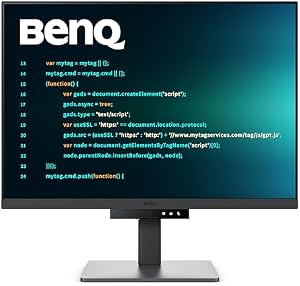
The RD280U is the most completely specified of the five on connectivity: its listing states 90W USB-C and KVM alongside a 28.2-inch size and a 3840×2560 resolution in a 3:2 aspect ratio. Its listed dimensions are 9.6 inches in length, 24.0 inches in width and 18.7 inches in height, at 16.8 pounds. Against the RD280UG, it trades the stated 120Hz refresh rate for the stated KVM and USB-C power figures.
Pros
- Listing states 3840×2560 resolution in a 3:2 aspect ratio
- Listing states 90W USB-C and KVM
- Listing states a Nano Matte Panel and coding modes for code differentiation
Cons
- Refresh rate is not stated in the listing
- Listed length of 9.6 inches is deeper than the RD280UG at 3.4 inches
| Spec | From the listing |
|---|---|
| Size | 28.2 |
| Resolution | 3840×2560 |
| USB-C power | 90W |
| Dimensions | 9.6 x 24.0 x 18.7 inches |
| Weight | 16.8 pounds |
| Color | Metal Grey |
2. BenQ RD280UG Programming Monitor — Best for fast scrolling

The RD280UG is the only one of the five whose listing states a refresh rate, at 120Hz, and it also states a 2000:1 contrast figure in its name and a 3:2 aspect ratio. Its listed dimensions are 3.4 inches in length, 24.0 inches in width and 17.0 inches in height, at 16.8 pounds, making its listed length the shortest of the five. The RD280UG listing gives its size as 28.2 inches in its name and 28.0 in its spec table. Skip it if you need a stated USB-C power figure, because its listing states none.
Pros
- Listing states a 120Hz refresh rate for scrolling and cursor movement
- Listing states a Nano Matte Panel with low reflection
- Listed length of 3.4 inches is the shortest stated of the five
Cons
- USB-C power is not stated in the listing
- Resolution is stated only as 4K+ in the listing, with no pixel count given
| Spec | From the listing |
|---|---|
| Refresh rate | 120Hz |
| Aspect ratio | 3:2 |
| Dimensions | 3.4 x 24.0 x 17.0 inches |
| Weight | 16.8 pounds |
| Color | Metal Grey |
| Contrast ratio | 2000:1 |
3. BenQ RD320UA Programming Monitor — Best large screen

The RD320UA gives you the larger panel in this group: a stated 32-inch size with a 3840×2160 resolution and a stated 2000:1 contrast ratio. Its listing states 90W USB-C, coding modes with dark and light themes, and Night Hours Protection. Its listed dimensions are 28.0 inches in length, 23.0 inches in width and 18.0 inches in height, and its listed weight of 34.17 pounds is the joint heaviest stated of the five, tied with the RD320U.
Pros
- Listing states a 32-inch size with 3840×2160 resolution
- Listing states 90W USB-C and a 2000:1 contrast ratio
- Listing states Night Hours Protection and MoonHalo with adjustable settings
Cons
- Listed weight of 34.17 pounds is the joint heaviest stated
- Refresh rate and aspect ratio are not stated in the listing
| Spec | From the listing |
|---|---|
| Size | 32.0 |
| Resolution | 3840×2160 |
| USB-C power | 90W |
| Dimensions | 28.0 x 23.0 x 18.0 inches |
| Weight | 34.17 pounds |
| Color | Metal Grey |
4. BenQ RD320U Programming Monitor — Best for late sessions

On stated figures, the RD320U matches the RD320UA on size, resolution, contrast and USB-C power: 32 inches, 3840×2160, 2000:1 and 90W. The difference is in the dimensions: it lists the same 28.0 inches in length and 23.0 inches in width, but a height of 10.2 inches against the RD320UA at 18.0 inches, while both list 34.17 pounds. Its listing also states Night Hours Protection for dark room usage.
Pros
- Listing states a 32-inch size with 3840×2160 resolution
- Listing states 90W USB-C and Night Hours Protection
- Listed height of 10.2 inches is the lowest stated of the five
Cons
- Listed weight of 34.17 pounds is the joint heaviest stated
- Refresh rate and aspect ratio are not stated in the listing
| Spec | From the listing |
|---|---|
| Size | 32.0 |
| Resolution | 3840×2160 |
| USB-C power | 90W |
| Dimensions | 28.0 x 23.0 x 10.2 inches |
| Weight | 34.17 pounds |
| Color | Metal Grey |
5. BenQ RD280UA Programming Monitor — Best for an adjustable arm

The RD280UA is the arm-mounted option here: its listing describes an Ergo Flexible Arm for screen positioning. It shares the stated 28.2-inch size and 3840×2560 resolution with the RD280U, and it also states 90W USB-C. Its listed dimensions are 18.0 inches in length, 24.0 inches in width and 27.0 inches in height — the tallest stated height of the five — at 16.8 pounds. The RD280UA listing states Fine-Coated Panel in its product name and Nano Matte Panel in its listing facts.
Pros
- Listing states an Ergo Flexible Arm for screen positioning
- Listing states 3840×2560 resolution and 90W USB-C
- Listed weight of 16.8 pounds matches the lightest stated group
Cons
- Listed height of 27.0 inches is the tallest stated of the five
- KVM and refresh rate are not stated in the listing
| Spec | From the listing |
|---|---|
| Size | 28.2 |
| Resolution | 3840×2560 |
| USB-C power | 90W |
| Dimensions | 18.0 x 24.0 x 27.0 inches |
| Weight | 16.8 pounds |
| Color | Metal Grey |
Shopping Checklist
Before you order, work through these steps against the listing for your finalist:
- Measure your desk surface and the clearance above it, then compare both with the listed length, width and height.
- Check the stated resolution and aspect ratio, and note where a listing states no aspect ratio.
- Check the stated USB-C power figure if you plan to connect a laptop with one cable.
- Check the panel and backlight details the listing states, including coding modes and night settings.
- Before you order a monitor, verify the return window on its product page.
- Compare your final two models side by side on weight, using the stated figures only.
FAQ
Does a 3:2 monitor show more code than a 3840×2160 monitor?
Based on the listing details, the RD280U and RD280UA state 3840×2560, a taller pixel count than the 3840×2160 stated for the two 32-inch models. The RD280U also states a 3:2 aspect ratio.
Which of these monitors states a refresh rate?
Only the RD280UG listing states one, at 120Hz, and it describes that rate in terms of scrolling and cursor movement. The other four listings state no refresh rate, so if that figure matters to you, treat it as a stated difference rather than assuming the others match it.
How do I choose between the two 32-inch models?
Compare the dimensions and the backlight wording. Both state 32 inches, 3840×2160, a 2000:1 contrast ratio and 90W USB-C, and both list 34.17 pounds. They differ on listed height — 18.0 inches for the RD320UA and 10.2 inches for the RD320U — so measure your space and use that stated difference to decide.
Final Verdict
Pick the RD280U for the most complete stated connectivity at 28.2 inches, the RD280UG if the stated 120Hz refresh rate is your priority, and the RD280UA if you want the arm described in its listing. Pick the RD320UA or RD320U if you want the larger 32-inch panel, and decide between them on the listed height. Base the call on the figures the listing states, and note the gaps where it states none.
Prime covers fast, free delivery on eligible items. See whether a Prime free trial is available for your account.
Check Prime on Amazon →Related Guides
No internal links were provided with this post, so this section lists none.
Product and ASIN Reference
| Product | ASIN |
|---|---|
| BenQ RD280U | B0D2PDYHD9 |
| BenQ RD280UG | B0G38RCQKN |
| BenQ RD320UA | B0DFCYXMD3 |
| BenQ RD320U | B0DFD2Q8F1 |
| BenQ RD280UA | B0D2PHW5Y8 |

Write Your Review
No reviews yet. Be the first to share your experience!