
All five listings are touchscreen displays that state Raspberry Pi compatibility in their facts, so every one is a match; the real choice is size, resolution, touch points and connection. The Hosyond is the only 7-inch panel and the only one on the Pi’s MIPI DSI interface; the other four are 10.1-inch screens (HDMI in two listings’ facts, name-only in two), with resolutions from 1024×600 up to 1920×1200.
Three listings carry spec-table dimensions that clash with their stated screen sizes — the ROADOM at 5.0 by 5.6 inches, the Forzola at 14.3 inches wide, the JUNEBOX at 2.76 by 1.97 inches — flagged below rather than used in any ranking. Settle the housing dimensions on the product page before planning a mount.
As an Amazon Associate, we earn from qualifying purchases.


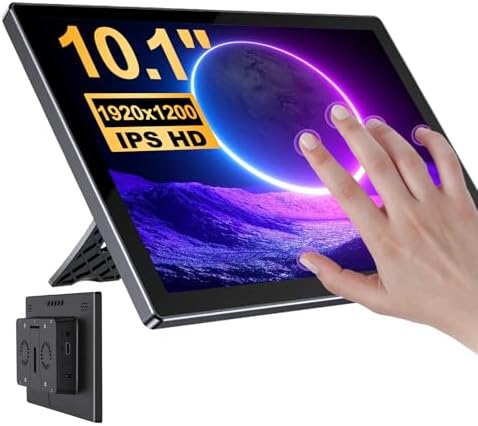
Pick by Your Need
- Best for a compact build: Hosyond 7 Inch DSI Display. The only 7-inch panel, on the Pi’s MIPI DSI interface.
- Best for sound without extra speakers: ROADOM 10.1 Inch Monitor. Its facts state dual built-in speakers rated 1W x 2.
- Best for a desk setup: ELECROW 10.1 Inch Monitor. It states an acrylic stand and 1280×800 resolution.
- Best for wall or enclosure mounting: Forzola 10.1 Inch Monitor. Stated 75mm VESA points and a built-in enclosure.
- Best for hiding the Pi inside the screen: JUNEBOX 10.1 Touchscreen. A back compartment that holds the Pi, per its facts.
Quick Answer
Start with size: the Hosyond is a 7-inch 800×480 DSI panel; the other four are 10.1-inch HDMI screens. On stated resolution, Forzola and JUNEBOX tie at 1920×1200, ahead of ELECROW at 1280×800, ROADOM at 1024×600 and Hosyond at 800×480. On stated touch, Forzola and JUNEBOX state 10-point, ROADOM 5-point, ELECROW 5-point on Windows but single-point on Raspberry Pi OS, and Hosyond two-point zoom on Raspbian, single-touch elsewhere. No listing is a partial or strict mismatch.
Comparison Table
| Product | Screen size | Resolution | Touch | Connection | Buy |
|---|---|---|---|---|---|
| Hosyond 7 Inch | 7 inches | 800×480 | Two-point zoom on Raspbian; single-touch elsewhere | MIPI DSI | View on Amazon |
| ROADOM 10.1 Inch | 10.1 inches | 1024×600 | 5-point capacitive | HDMI (product name) | View on Amazon |
| ELECROW 10.1 Inch | 10.1 inches | 1280×800 | 5-point on Windows; single-point on Pi OS | HDMI + USB | View on Amazon |
| Forzola 10.1 Inch | 10.1 inches | 1920×1200 | 10-point | HDMI | View on Amazon |
| JUNEBOX 10.1 Inch | 10.1 inches | 1920×1200 | 10-point | HDMI, USB-C (product name) | View on Amazon |
Decision Guide
Choose the connection first. The Hosyond connects over MIPI DSI, and its facts state it has no HDMI port and works with no other device. The other four state HDMI input; the ELECROW states its route most completely, HDMI for video and USB for power. The ROADOM’s HDMI input and the JUNEBOX’s HDMI and USB-C inputs appear in their product names, not their facts, so confirm the ports on the product page.
Resolution forms the cleanest ladder: Forzola and JUNEBOX tie at 1920×1200, then ELECROW at 1280×800, ROADOM at 1024×600 and Hosyond at 800×480; the Forzola alone adds stated 60 Hz refresh and 72 percent NTSC figures. Touch carries conditions: Forzola and JUNEBOX state 10-point touch with no operating-system condition, ROADOM states 5-point, and ELECROW states 5-point on Windows but single-point on Raspberry Pi OS. The Hosyond states the least: two-point zoom on Raspbian (old version) and single-touch on Ubuntu, Kali and Win10 IoT.
Mounting separates the larger screens: ELECROW includes an acrylic stand and four back mounting holes; Forzola states a built-in enclosure, a Pi adapter plate and 75mm VESA points; JUNEBOX states a detachable back cover with a Pi compartment; ROADOM, an all-in-one protective case. On stated weight, Hosyond is lightest at 0.73 pounds and ROADOM heaviest at 1.23, with JUNEBOX at 1.0 and ELECROW at 1.15 between them; Forzola states no weight. Where spec-table dimensions conflict with the stated screen size, settle the housing size on the product page.
1. Hosyond 7 Inch DSI Touchscreen — Best Compact DSI Panel
This is the only panel built around the Pi’s own display interface: its facts state a 7-inch IPS capacitive screen at 800×480 connecting to the MIPI DSI interface, no additional connections required. Smallest and lightest stated here, it suits compact projects over desktop monitor roles.
| Spec | From the listing |
|---|---|
| Size | 7 inches |
| Width | 6.49 inches |
| Height | 4.02 inches |
| Weight | 0.73 pounds |
2. ROADOM 10.1 Inch Touchscreen Monitor — Best Built-In Speakers
The ROADOM’s facts describe a 10.1-inch IPS monitor at 1024×600 with a 178-degree viewing angle, 5-point capacitive touch and a stated 3-5ms response, working with Raspberry Pi 5, 4, 3 and Zero. It is the only listing whose facts state built-in speakers (dual, 1W x 2) and an all-in-one protective case. One caution: its spec table lists a 5.0 by 5.6 inch body, impossible for a 10.1-inch housing.
| Spec | From the listing |
|---|---|
| Size | 10.1 Inch |
| Width | 5.6 inches |
| Height | 0.5 inches |
| Weight | 1.23 pounds |
3. ELECROW 10.1 Inch Touchscreen With Stand — Best With a Stand
The ELECROW’s facts state a 10.1-inch IPS LCD at 1280×800, supplied with an acrylic stand and four back mounting holes. Its connection is the most completely stated here: HDMI for video, USB for power; compatibility is stated for Pi 5, 4 and 3. Its touch carries a condition: 5-point on Windows, single-point on Raspberry Pi OS.
| Spec | From the listing |
|---|---|
| Size | 10.1″ with Acrylic Stand |
| Width | 9.43 inches |
| Height | 6.2 inches |
| Weight | 1.15 pounds |
4. Forzola 10.1 Inch Touchscreen With Enclosure — Best for VESA Mounting
The Forzola’s facts state a 10.1-inch IPS LCD at 1920×1200 with 60 Hz refresh and 72 percent NTSC coverage — the joint-highest stated resolution here, tied with the JUNEBOX. It states 10-point touch, driver-free HDMI, compatibility with Pi 5, 4, 3B+, 3, 2 and Zero, a built-in enclosure, a Pi adapter plate and 75mm VESA points. Two gaps need a product-page check: no stated weight, and a spec-table width of 14.3 inches that does not fit a 10.1-inch screen.
| Spec | From the listing |
|---|---|
| Size | 10.1 |
| Width | 14.3 inches |
| Height | 8.0 inches |
| Weight | The listing does not state it |
5. JUNEBOX 10.1 Touchscreen With Back Compartment — Best Stated Touch Response
The JUNEBOX’s facts state a 10.1-inch IPS glossy panel at 1920×1200, tying the Forzola for the highest stated resolution here, plus 10-point capacitive touch with a stated 0.5ms response, the lowest stated figure in the set. Its detachable back cover hides a compartment for the Pi, and compatibility is stated for Pi 5, 4, 3B+, 3, 2 and Zero. Its spec table lists a 2.76 by 1.97 inch body that cannot house a 10.1-inch panel, and its HDMI/USB-C connection and dual speakers appear in its product name, not its facts.
| Spec | From the listing |
|---|---|
| Size | The listing does not state it |
| Width | 2.76 inches |
| Height | 1.97 inches |
| Weight | 1.0 pounds |
Shopping Checklist
- Measure your project’s space first, and compare it with each screen’s stated size.
- Where a spec-table dimension conflicts with the stated screen size, settle the real figure on the product page.
- Check the stated connection and mounting — DSI or HDMI, stand, enclosure or VESA points — against your build’s parts.
- Check the product page’s return window before ordering, especially where a figure is unstated.
- Compare two or three finalists on stated resolution, touch points and compatibility, not screen size alone.
- Do not buy a size you did not measure space for, or assume a port carried only in a product name.
FAQ
DSI or HDMI for a Raspberry Pi?
Choose DSI when the screen will live with one Pi in a compact project: the Hosyond states a direct MIPI DSI connection and no HDMI port. Choose HDMI when the screen may move between devices, since the other four listings offer HDMI input. Confirm the exact ports on the product page either way — some listings place them in the product name, not the facts.
Does touch point count matter?
It matters if your software uses pinch zoom or multi-finger gestures. Read each listing’s conditions: the ELECROW states 5-point touch on Windows but single-point on Raspberry Pi OS, the Hosyond states two-point zoom on Raspbian with single-touch elsewhere, and the Forzola and JUNEBOX state 10-point touch with no operating-system condition. Match the stated touch support to the system you will run.
What should I verify on the product page before ordering?
Verify housing dimensions wherever a spec table conflicts with the stated screen size, as for the ROADOM, Forzola and JUNEBOX. Verify unstated figures, such as the Forzola’s weight, and name-only features, such as the JUNEBOX’s ports and speakers. Then confirm the compatibility list covers your Pi model.
Final Verdict
All five listings state a touchscreen and Raspberry Pi compatibility. Pick the Hosyond for a compact, Pi-dedicated DSI build. Pick the ROADOM if stated built-in speakers and a protective case matter more than resolution, and the ELECROW for a stand and the fullest stated connection route, accepting single-point touch on Pi OS. Pick the Forzola for enclosure and VESA mounting at 1920×1200, or the JUNEBOX for the same resolution with the Pi inside its back compartment and the lowest stated touch response. Settle the flagged dimension conflicts and unstated figures on the product page.
Prime covers fast, free delivery on eligible items. See whether a Prime free trial is available for your account.
Check Prime on Amazon →Product and ASIN Reference
| Product | ASIN | Keyword match | Buy |
|---|---|---|---|
| Hosyond 7 Inch | B0D3QB7X4Z | Match | View on Amazon |
| ROADOM 10.1 Inch | B0CJNKFVPY | Match | View on Amazon |
| ELECROW 10.1 Inch | B0BHHQLKPY | Match | View on Amazon |
| Forzola 10.1 Inch | B0GBTMSV5F | Match | View on Amazon |
| JUNEBOX 10.1 Inch | B0F43JQRP1 | Match | View on Amazon |
Types of Raspberry Pi Setups
Raspberry Pi boards and accessories are grouped mainly by generation and by storage setup. NAS-enclosure builds turn a Pi into a small network storage device. Standard project builds use the Pi's GPIO pins and general-purpose computing for a wide range of smaller electronics or home-automation projects.
Using a Raspberry Pi as a NAS generally means slower performance than a purpose-built NAS device, but at a lower cost and smaller footprint, which matters most for light, personal backup needs rather than heavy multi-user file sharing.
Frequently Asked Questions
Can a Raspberry Pi really work as a NAS device?
Yes, with the right enclosure and storage setup, though it generally performs more slowly than a purpose-built NAS, making it better suited to light personal backups than heavy multi-user file sharing.
Does a Raspberry Pi need a case for most projects?
It's strongly recommended -- an enclosure protects the board's exposed components and, for NAS or sustained-use builds, can add cooling or proper drive mounting that the bare board lacks.
Write Your Review
No reviews yet. Be the first to share your experience!