
Pick the Dell 27 Plus QHD if you want the highest stated refresh rate among the desk models, the Dell 27 4K if pixel count matters most, and the MNN portable if the screen has to travel with your laptop. The LG suits a desk where low weight counts, and the Dell 34 gives the widest workspace here.
Power delivery runs from 15W on the LG to 65W on the three Dell desk models, screen size from 15.6 inches to 34 inches, and resolution from 1920 x 1080 to 3840 x 2160. Your laptop and desk width decide the right pick.
As an Amazon Associate, we earn from qualifying purchases.


Pick by Your Need
- Best overall: Dell 27 Plus QHD S2725DC. It pairs 2560 x 1440 resolution with a 144Hz refresh rate, the highest stated refresh rate among the desk models.
- Best for 4K detail: Dell 27 4K S2725QC. Its 3840 x 2160 panel and 163 PPI give the highest pixel count of the five.
- Best for travel: MNN 15.6 Inch Portable Monitor. At 0.3 inches thick with a cover that doubles as a stand, it is the only portable design here.
- Best for a lighter desk: LG 27 Inch QHD 27U631A-B. At 9.7 pounds, it is the lightest desk monitor here.
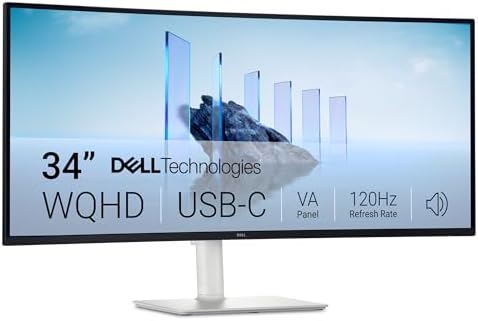
- Best for ultrawide work: Dell 34 Ultrawide S3425DW. Its 34-inch WQHD panel is 31.78 inches wide with a 3000:1 contrast ratio.
Quick Answer
For most desk setups, the Dell 27 Plus QHD S2725DC covers the widest ground with QHD resolution, a 144Hz refresh rate, and USB-C power delivery up to 65W. Choose the Dell 27 4K S2725QC if resolution matters more, and the MNN portable if the screen must fit in a bag.
Comparison Table
| Product | Best for | Size and resolution | USB-C power delivery | One trade-off | Buy |
|---|---|---|---|---|---|
| Dell 27 Plus QHD S2725DC | High refresh at a desk | 27 inches, 2560 x 1440 | Up to 65W | 14.29 pounds, above the LG | View on Amazon |
| Dell 27 4K S2725QC | Maximum pixel count | 27 inches, 3840 x 2160 | Up to 65W | 120Hz rate, below 144Hz | View on Amazon |
| MNN 15.6 Inch Portable Monitor | Travel and mobile work | 15.6 inches, 1920 x 1080 | not stated | Lowest resolution of the five | View on Amazon |
| LG 27 Inch QHD 27U631A-B | A lighter desk setup | 27 inches, 2560 x 1440 | Up to 15W | 50W below Dell desk models | View on Amazon |
| Dell 34 Ultrawide S3425DW | Side-by-side workspace | 34 inches, WQHD | Up to 65W | Heaviest desk model here at 20.68 pounds | View on Amazon |
Decision Guide
Start with where the screen will live. The three 27-inch models each measure about 24.1 inches wide, the Dell 34 requires 31.78 inches of desk width, and the MNN fits a bag at 14.48 inches wide and 0.3 inches thick.
If one cable must run the picture and charge a laptop, choose a Dell desk model, each listed with USB-C power delivery up to 65W. The LG stops at 15W, a 50W gap that is the clearest dividing line here, so check your charging requirement first.
If pixel count leads, choose the Dell 27 4K S2725QC at 3840 x 2160 and 163 PPI. If motion rate leads, choose the Dell 27 Plus QHD S2725DC at 144Hz, ahead of 120Hz on the 4K Dell and the Dell 34 and 100Hz on the LG. If two windows side by side lead, choose the Dell 34, the only ultrawide here.
For work away from a desk, choose the MNN, the only model with two full feature Type-C ports and a cover that doubles as a stand. Its condition is compatibility: your device needs Thunderbolt 3.0 or DP Alt-Mode support. Panel type is the last filter: the Dell 34 uses a VA panel, the other four use IPS.
1. Dell 27 Plus QHD S2725DC — Best Overall
This is the only pick pairing QHD at 2560 x 1440 with a 144Hz refresh rate and 1ms Moving Picture Response Time, above the 120Hz and 100Hz rates on the other desk models. Its main USB-C connection delivers up to 65W, and a pop-out port adds USB-C at up to 15W plus a USB Type-A connection no other listing describes. The stand adjusts for height, tilt, pivot, and swivel, and its dual 3W speakers are smaller than the 2 x 10W units on the Dell 34. Its 14.29-pound weight is the trade-off against the 9.7-pound LG.
| Spec | From the listing |
|---|---|
| Screen size | 27 inches |
| Resolution | 2560 x 1440 (QHD) |
| Refresh rate | 144Hz |
| USB-C power delivery | Up to 65W |
| Weight | 14.29 pounds |
2. Dell 27 4K S2725QC — Best for 4K Detail
This model stands apart on pixel count: 3840 x 2160 resolution at 163 PPI is the highest figure here, above the 2560 x 1440 panels and the 1920 x 1080 portable. It covers desk basics with USB-C power delivery up to 65W, HDMI and DisplayPort connections, 99% sRGB coverage, a 1500:1 contrast ratio, and a refresh rate up to 120Hz with AMD FreeSync Premium. One figure conflicts: the product name lists a 4ms response time, while the listing details list 0.03ms, so check the product page for that figure. The trade-off is weight, since at 14.79 pounds it is the heaviest 27-inch model here.
| Spec | From the listing |
|---|---|
| Screen size | 27 inches |
| Resolution | 3840 x 2160 (4K UHD) |
| Refresh rate | Up to 120Hz |
| USB-C power delivery | Up to 65W |
| Weight | 14.79 pounds |
3. MNN 15.6 Inch Portable Monitor — Best for Travel
This is the only portable design here, built around a 15.6-inch 1920 x 1080 IPS glossy panel in a body measuring 14.48 inches wide, 8.85 inches tall, and 0.3 inches thick. It is also the only model with 2 full feature Type-C ports, and one cable carries both power and the display signal. The smart cover, made with a PU leather exterior, doubles as a stand for landscape and portrait use, with copy, extended, second screen, and portrait modes plus an HDR mode. The trade-off is output: 1920 x 1080 is the lowest resolution here, on the smallest panel.
| Spec | From the listing |
|---|---|
| Screen size | 15.6 inches |
| Resolution | 1920 x 1080 |
| Dimensions | 14.48 x 8.85 x 0.3 inches |
| USB-C ports | 2 full feature Type-C ports |
| Weight | The listing does not state it |
4. LG 27 Inch QHD 27U631A-B — Best Lightweight 27-Inch Option
At 9.7 pounds, this is the lightest desk monitor here, 4.59 pounds below the Dell 27 Plus and about 11 pounds below the Dell 34, on a 27-inch QHD IPS panel at 2560 x 1440. Its listing names HDR10, up to 99% sRGB color gamut expression, Reader Mode, Flicker Safe, and Dynamic Action Sync. The refresh rate is 100Hz with a 5ms (GTG) response time, below the Dell desk models. The trade-off is power: USB Type-C delivery stops at 15W, 50W below the Dell desk models.
| Spec | From the listing |
|---|---|
| Screen size | 27 inches |
| Resolution | 2560 x 1440 (QHD) |
| Refresh rate | 100Hz |
| USB-C power delivery | Up to 15W |
| Weight | 9.7 pounds |
5. Dell 34 Ultrawide S3425DW — Best for Ultrawide Work
This is the widest screen here by a full format step: a 34-inch WQHD VA panel measuring 31.78 inches wide, against roughly 24 inches for each 27-inch model. Its 3000:1 contrast ratio is double the 1500:1 listed for the two 27-inch Dell models, color coverage reaches 99% sRGB and 95% DCI-P3, with 300 cd/m2 brightness and HDR10 support. Speakers carry the highest stated wattage here at 2 x 10W, and USB-C delivery matches the other Dell desk models at up to 65W. The trade-off is scale: at 20.68 pounds it is the heaviest of the models with a stated weight, and its width rules out narrower desks.
| Spec | From the listing |
|---|---|
| Screen size | 34 inches |
| Resolution | WQHD |
| Refresh rate | Up to 120Hz |
| Contrast ratio | 3000:1 |
| USB-C power delivery | Up to 65W |
| Weight | 20.68 pounds |
Buying Checklist
- Measure desk width first: the 27-inch models need about 24.1 inches, the Dell 34 needs 31.78 inches, and the MNN needs 14.48 inches.
- Confirm your device supports USB-C display output, and check for Thunderbolt 3.0 or DP Alt-Mode support if you pick the MNN.
- Match power delivery to your laptop: 65W if one cable must charge it, or 15W on the LG with its own adapter.
- Compare finalists on resolution, refresh rate, contrast ratio, and color coverage.
- Check the return window on the product page before ordering.
FAQ
How much USB-C power delivery do you actually need?
The three Dell desk models each list USB-C power delivery up to 65W, while the LG lists up to 15W. If one cable has to charge your laptop while it drives the screen, pick from the 65W models. If your laptop keeps its own charger, the LG figure matters less.
Which screen size fits a small desk or a travel bag?
The MNN is the travel fit at 14.48 inches wide and 0.3 inches thick, with a cover that doubles as a stand. The 27-inch models each measure about 24.1 inches wide, while the Dell 34 needs 31.78 inches. Measure first, then match against those widths.
Should you pick a higher resolution or a higher refresh rate?
The two goals point to different models here: the Dell 27 4K reaches 3840 x 2160 at up to 120Hz, while the Dell 27 Plus QHD reaches 144Hz at 2560 x 1440. Pick the 4K model if pixel count leads, the 144Hz model if motion rate leads.
Final Verdict
The Dell 27 Plus QHD S2725DC is the most balanced desk pick here, combining QHD resolution, a 144Hz refresh rate, 65W power delivery, and four stand adjustments. The Dell 27 4K S2725QC is the pick when pixel count leads, and the Dell 34 S3425DW is the pick when width and contrast lead. The LG earns its place on weight at 9.7 pounds if 15W power delivery fits your plan, and the MNN is the only travel option.
Prime covers fast, free delivery on eligible items. See whether a Prime free trial is available for your account.
Check Prime on Amazon →Types of Computer Monitors
Monitors outside gaming-specific models are grouped mainly by resolution and by color accuracy. Standard monitors cover general productivity use. Color-accurate monitors (rated for DCI-P3 or similar) suit photo and video editing, where consistent, wide color coverage matters more than raw refresh rate.
A blue-light filter (hardware or software-based) reduces a specific part of the light spectrum associated with eye strain during long sessions, which is a separate feature from the panel's resolution or color accuracy.
Frequently Asked Questions
What does a DCI-P3 color rating mean on a monitor?
It indicates the monitor can display a wider range of colors than a standard sRGB-rated panel, which matters most for photo, video, and design work where accurate color reproduction is important.
Does a blue-light filter reduce image quality?
It can shift color temperature noticeably warmer while active, so many users reserve blue-light filtering for evening use and turn it off for color-critical work.
Related Guides
No related guides are listed for this post. Use the comparison table and decision guide above.
Product and ASIN Reference
| Product | ASIN | Buy |
|---|---|---|
| Dell 27 Plus QHD S2725DC | B0GD21577Z | View on Amazon |
| Dell 27 4K S2725QC | B0F1GFD44G | View on Amazon |
| MNN 15.6 Inch Portable Monitor | B0B9NNWXVP | View on Amazon |
| LG 27 Inch QHD 27U631A-B | B0DS2S3GF2 | View on Amazon |
| Dell 34 Ultrawide S3425DW | B0F1H325FN | View on Amazon |








Write Your Review
No reviews yet. Be the first to share your experience!